Blog · Making stickers
How to make stickers without a Cricut
You do not need a cutting machine to make real stickers. A Cricut only cuts — and scissors, a craft knife, or a $6 punch cut too. Design a sheet in a free browser tool, print it at home, and cut it out by hand. Here is the whole no-machine method, plus how to make the cuts look clean.
Affiliate links: some links on this page go to Amazon. As an Amazon Associate, I may earn a commission from qualifying purchases, at no extra cost to you.
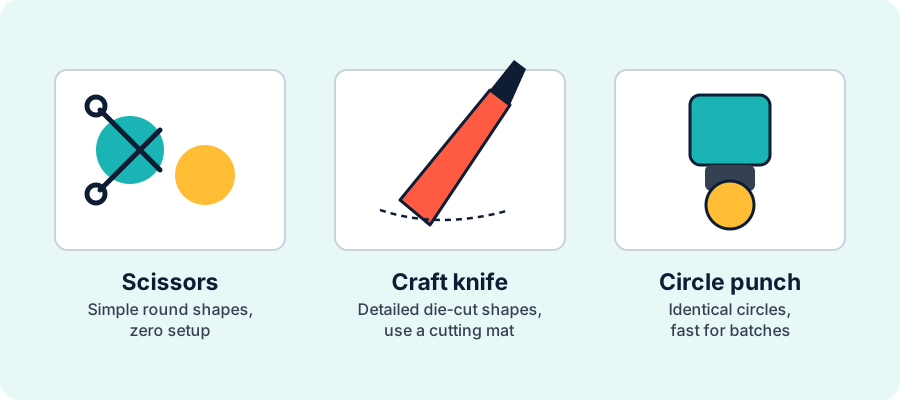
Fast version: lay out your artwork in the free sticker maker, print the sheet on inkjet sticker paper at 100% scale, and cut each sticker out with scissors (simple shapes), a craft knife on a mat (detailed shapes), or a circle punch (batches). Add a small white border and you'll never notice a slightly wobbly cut.
What you need (no machine)
The whole point of skipping the Cricut is that the kit is short and cheap. You almost certainly own most of it:
- Artwork laid out as a sheet — done free in your browser (next step).
- An inkjet printer — any home printer that prints photos works.
- Sticker paper — matte inkjet sticker paper is the most forgiving to print and cut.
- Something to cut with — sharp scissors, a craft knife plus a cutting mat, or a shape punch.
- Optional protection — clear laminate sheets for water resistance.
Step 1: Design the sheet online
Instead of cutting one sticker at a time, arrange several onto one sheet so a single print gives you a batch. Open the free sticker maker, upload your PNGs, JPGs, or SVGs (or pick from the built-in icons), and set how many rows and columns you want with spacing between them. Because you are cutting by hand, turn on a light dashed cut guide around each sticker — it gives your scissors or knife a line to follow. Making planner stickers? The planner sticker page is pre-set for that grid.
Already have your artwork? Follow how to make a printable sticker sheet from PNG or JPG images for the upload, size, repetition, and PDF settings.
Ready to lay one out? Open the sticker maker and drop your art in — no account, no watermark.
Step 2: Print at home
Load your sticker paper and print the sheet at 100% / Actual Size — do not let the printer "fit to page," or your carefully spaced grid shifts. Set the printer's media to match your paper (matte photo or high quality) for crisp color, and let the ink dry fully before you touch it, especially on glossy or vinyl stock. If you want a step-by-step on printer settings, see how to print stickers at home.
Step 3: Make them last (optional but worth it)
Plain paper stickers are perfect for laptops, notebooks, and planners. Anything that meets water — water bottles, tumblers, outdoor gear — needs a protective layer. Without a laminator you have three easy options: press self-adhesive laminate sheets over the printed sheet, cover it with clear packing tape for a quick fix, or print on printable vinyl and seal it. Whichever you choose, apply it before you cut so the cut seals the edges. The full method and realistic durability is in how to waterproof stickers.
Step 4: Cut by hand
Match the tool to the shape:
- Scissors — best for simple rounded shapes and getting started with zero setup. Turn the paper into the blade rather than the blade into the paper for smoother curves.
- Craft knife on a cutting mat — best for detailed or intricate die-cut shapes and tight inside corners. A fresh blade makes all the difference; a dull one drags and tears the paper.
- Shape punch — best for volume when every sticker is the same circle or shape. Line the punch up over each design and it stamps out identical stickers fast. (Punches only do their one shape, so design your sheet to match the punch size.)
The trick to neat hand-cut stickers
Here is the secret that makes homemade stickers look bought: a small white border. Leave a couple of millimetres of white (or a colored contour) around each design and cut just outside the artwork instead of right along the edge. A slightly wobbly cut then reads as an intentional die-cut outline rather than a mistake, and you never risk clipping the art itself. The sticker maker can add that contour automatically, the same way a print shop would. Cut a hair outside the line, not on it, and go slowly on curves.
When it's worth buying a machine
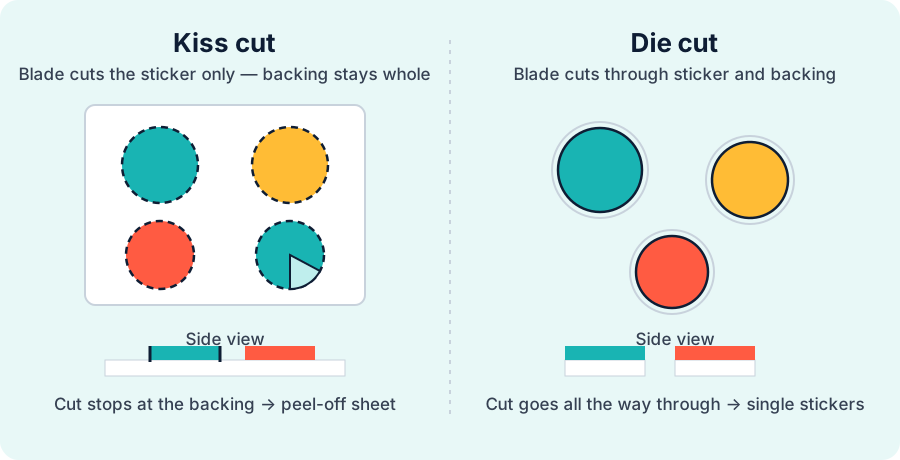
Buy a cutting machine when hand-cutting becomes the bottleneck — not before. If you're making a handful of stickers for yourself or a gift, hand-cutting is genuinely fine and far cheaper. Once you're cutting dozens of sheets, or you want clean peel-off kiss-cut sheets, a machine's Print Then Cut earns its keep. When you get there, compare your options in best Cricut for making stickers and learn the workflow in how to make stickers with a Cricut.
Frequently asked questions
Can you make stickers without a Cricut?
Yes. A Cricut only cuts, so you can replace it with scissors, a craft knife, or a paper punch. Design a sheet in a free online tool, print it on inkjet sticker paper, and cut each sticker by hand. The only thing you lose is speed at high volume.
What do you need to make stickers at home without a machine?
Artwork laid out as a sheet, an inkjet printer, sticker paper, and something to cut with — scissors, a craft knife and mat, or a shape punch. Optional clear laminate makes them water resistant.
How do you make stickers waterproof without a laminator?
Use self-adhesive laminate sheets or clear packing tape over the sheet, or print on printable vinyl and seal it. Apply the protective layer before you cut so the edges are sealed. A brush-on or spray sealer also gives light water resistance.
Is it cheaper to make stickers without a Cricut?
Yes, to start. You skip the machine and mats and only pay for sticker paper and ink. A cutting machine pays off later, when hand-cutting volume becomes the bottleneck.
How do you cut stickers neatly by hand?
Add a small white border around each design and cut just outside the artwork, so a slightly wobbly cut still looks intentional. Use sharp scissors for simple shapes, a fresh craft-knife blade on a mat for detailed shapes, and a punch for identical circles.
- Matte sticker paper — forgiving inkjet starter stock
- Craft knife + cutting mat — for detailed die-cut shapes
- Clear laminate sheets — water resistance without a laminator; apply before cutting
- Printable vinyl — durable base for outdoor stickers
What to read next
Lay out your first sheet in the free sticker maker, then dial in printing with how to print stickers at home and pick a stock with the best sticker paper guide. Thinking about a machine later? Start with best Cricut for making stickers.